Cloud storage has become part of everyday life. Whether you are saving personal photos, school assignments, work documents, or important backups, chances are you rely on services like Google Drive, Dropbox, OneDrive, or iCloud to keep your files safe and accessible. The convenience is undeniable. You can access your data from any device, share files instantly, and avoid losing information if your computer breaks.
But there’s one important question many people forget to ask: how secure are your files in the cloud?
(You will be redirected to another page)
While cloud platforms invest heavily in security, your data is not automatically protected just because it’s stored online. In fact, many security problems happen because of weak passwords, poor habits, or misconfigured settings, not because the cloud provider failed.
The truth is simple. Cloud storage is safe when used correctly, but risky when used carelessly.
In this complete beginner-friendly guide, you’ll learn how cloud storage works, what the real risks are, and the best cloud security practices you should follow to protect your personal and professional files.
What Is Cloud Storage and How Does It Work?
Before talking about security, it’s important to understand what cloud storage actually is.
Cloud storage means your files are stored on remote servers instead of only on your computer or phone. These servers are managed by companies like Google, Microsoft, Apple, or Dropbox. When you upload a file, it travels through the internet and is saved in large data centers.
From there, you can access your files anytime by logging into your account.
This offers several advantages. Your files are backed up automatically, you can collaborate easily with others, and you don’t depend on a single device. If your laptop is stolen or damaged, your documents are still safe in the cloud.
However, because everything is connected to the internet, your data also becomes a potential target for hackers, scammers, or unauthorized access.
Why Cloud Security Matters More Than Ever
Many people assume that only large companies get hacked, but everyday users are often easier targets.
Cybercriminals don’t always break into the cloud provider itself. Instead, they try to steal your login credentials. Once they have your email and password, they can simply log in like you and download everything.
Imagine losing access to:
Personal photos and memories
Tax documents
Business files
Client information
School projects
Contracts and passwords
For businesses and freelancers, a breach can mean financial loss, legal problems, and damaged reputation.
For individuals, it can mean identity theft or private information being exposed.
That’s why protecting your cloud account is just as important as protecting your bank account.
(You will be redirected to another page)
Common Cloud Security Risks You Should Know
Understanding the risks helps you avoid them.
One of the most common risks is weak passwords. If your password is simple or reused across multiple sites, hackers can easily guess or steal it.
Phishing attacks are also extremely common. Fake emails pretending to be from Google or Dropbox try to trick you into entering your credentials on a fake website.
Another risk is public file sharing. Sometimes users accidentally make files public, allowing anyone with the link to view or download sensitive information.
Using public Wi-Fi without protection is also dangerous. Attackers can intercept your data on unsecured networks.
Malware infections on your computer can sync automatically with the cloud, spreading infected files across all your devices.
Most cloud breaches happen because of these everyday mistakes, not advanced hacking.
Use Strong and Unique Passwords
The first and most important security step is creating strong passwords.
Your cloud account password should be long, complex, and unique. Avoid obvious choices like your name, birthday, or simple combinations like “123456.”
A good password includes uppercase letters, lowercase letters, numbers, and symbols.
Even more important, never reuse the same password across different websites. If one site gets hacked, attackers will try the same password everywhere else.
If remembering many passwords feels difficult, use a password manager. These tools generate strong passwords and store them safely, so you only need to remember one master password.
This single change can dramatically improve your security.
Enable Two-Factor Authentication (2FA)
If you only follow one security tip from this article, make it this one.
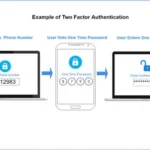
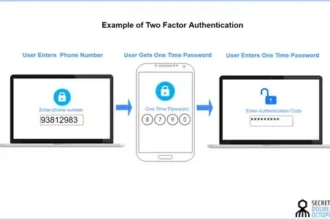
Two-factor authentication adds an extra layer of protection beyond your password. After entering your password, you must confirm your identity with a second step, usually a code sent to your phone or generated by an app.
This means that even if someone steals your password, they still can’t access your account without your device.
Most cloud providers offer 2FA for free. You just need to activate it in your account settings.
It takes only a few minutes but can prevent most account takeovers.
Manage File Sharing Carefully
Cloud storage makes sharing easy, but it also creates risks if you’re not careful.
Many users accidentally share files publicly without realizing it. Some links allow “anyone with the link” to access content, which can be dangerous for sensitive documents.
Always check your sharing settings before sending files.
Use private sharing when possible, granting access only to specific email addresses. Avoid public links for confidential information.
Regularly review shared files and remove access for people who no longer need it.
Good sharing habits prevent accidental data leaks.
(You will be redirected to another page)
Encrypt Sensitive Files
Most cloud services already encrypt your data during transfer and storage. However, for highly sensitive information, you can add an extra layer of protection.
Encrypting files before uploading them ensures that even if someone gains access, they cannot read the contents without the encryption key.
There are simple tools that allow you to encrypt folders or documents with a password before uploading.
This is especially useful for financial records, legal documents, or private business data.
Encryption adds peace of mind for your most critical files.
Avoid Public Wi-Fi Without Protection
Public Wi-Fi networks in cafés, airports, or hotels are convenient but risky.
Hackers on the same network may try to intercept your traffic and steal login information.
If you must access your cloud account on public Wi-Fi, use a VPN. A VPN encrypts your connection, making it much harder for others to spy on your activity.
Alternatively, wait until you’re on a secure home or mobile network.
A simple connection choice can prevent major problems.
Keep Devices and Software Updated
Outdated devices and apps often contain security vulnerabilities.
Always keep your operating system, browser, and cloud apps updated. Updates frequently include security patches that fix weaknesses hackers could exploit.
Also install antivirus or anti-malware software to detect threats before they spread to your cloud storage.
Remember that your cloud is only as safe as the devices connected to it.
Create Regular Backups
Even though the cloud is a backup solution, you should still maintain extra copies of important data.
Accidental deletions, ransomware, or sync errors can still cause losses.
Keep backups on an external drive or another cloud service. Having multiple copies ensures you never lose critical information.
The rule is simple: never rely on just one storage location.
Final Thoughts
Cloud storage is one of the most useful technologies of modern life. It offers convenience, flexibility, and protection against hardware failures. But security doesn’t happen automatically.
Your habits matter more than the platform.
By using strong passwords, enabling two-factor authentication, managing sharing settings, encrypting sensitive files, avoiding risky networks, and keeping devices updated, you can protect your data effectively.
You don’t need to be a cybersecurity expert to stay safe. Small, consistent actions make a huge difference.
Think of cloud security as locking your digital home. The tools are already there. You just need to use them.
Start today, review your settings, strengthen your protection, and enjoy the benefits of the cloud with confidence and peace of mind.
 Keep an eye on this