The internet has made life faster, easier, and more connected than ever before. You can pay bills in seconds, talk to family across the world, store thousands of photos in the cloud, and run an entire business from your laptop. But behind all this convenience, there is a hidden risk that many people underestimate: cybercriminals are constantly trying to steal your information.
Most people imagine hackers as highly technical geniuses breaking into complex systems. In reality, many attacks are surprisingly simple. Often, hackers don’t “break in” at all — they trick you into opening the door yourself.
(You will be redirected to another page)
Every day, millions of people lose passwords, bank details, personal files, and even money because they clicked the wrong link, downloaded the wrong file, or trusted the wrong message. The good news is that once you understand how these attacks work, it becomes much easier to avoid them.
In this guide, you’ll learn exactly how hackers steal your information, the most common online threats like phishing, malware, and ransomware, and what you can do to protect yourself before becoming the next victim.
Why Your Information Is Valuable to Hackers
Before understanding the attacks, it’s important to know why hackers want your data in the first place.
Your personal information is extremely valuable on the black market. Things like email accounts, passwords, credit card numbers, and identity documents can be sold or used for fraud. Even social media accounts can be hijacked to scam other people.
Hackers may use your data to steal money, impersonate you, access your work accounts, or lock your files and demand payment. Sometimes they don’t even target you specifically. Automated systems scan the internet looking for easy victims.
To a cybercriminal, you’re not just a person — you’re an opportunity.
That’s why learning how attacks happen is the first step toward staying safe.
Phishing: The Art of Tricking You
Phishing is one of the most common and successful cyberattacks in the world. It doesn’t rely on technical skills. Instead, it relies on psychology.
In a phishing attack, hackers pretend to be someone you trust. They might send an email that looks like it’s from your bank, Netflix, PayPal, or even your boss. The message usually creates urgency or fear, such as telling you that your account will be suspended or that suspicious activity was detected.
The email includes a link that leads to a fake website. The page looks real, but it’s controlled by criminals. When you enter your login details, you’re handing your password directly to the attacker.
Phishing can also happen through SMS messages (smishing), phone calls (vishing), or social media.
These scams work because they feel legitimate and rush you into acting quickly without thinking.
Common signs of phishing include strange email addresses, spelling mistakes, urgent threats, or links that look slightly different from official websites.
(You will be redirected to another page)
Malware: Dangerous Software Hidden in Files and Apps
Malware stands for malicious software. It refers to any program designed to harm your device or steal your data.
Unlike phishing, which tricks you into giving away information, malware secretly infects your system and steals data in the background.
Malware can be hidden inside fake downloads, email attachments, pirated software, or suspicious websites. Once installed, it may spy on you, record your keystrokes, steal passwords, or give hackers remote access to your computer.
There are several types of malware. Viruses spread from file to file and damage systems. Trojans pretend to be useful programs but secretly perform harmful actions. Spyware monitors your activity without your knowledge.
Often, you won’t even notice malware running. Your computer might just feel slower or behave strangely.
This silent behavior makes malware especially dangerous.
Ransomware: When Hackers Lock Your Files
Ransomware is one of the most frightening types of cyberattacks.
Instead of quietly stealing your data, ransomware locks your files completely. You suddenly lose access to photos, documents, and important work files. Then a message appears demanding payment — usually in cryptocurrency — to unlock them.
Imagine turning on your computer and finding that everything is encrypted. Years of memories or business data become inaccessible in seconds.
Some victims pay the ransom and never get their files back. Others refuse and lose everything.
Ransomware often spreads through email attachments, infected downloads, or compromised websites. Businesses, hospitals, and individuals are all targets.
The only real protection is prevention and regular backups. If you have copies of your files stored safely elsewhere, ransomware loses its power.
Password Attacks and Data Breaches
Not all attacks happen directly on your device. Sometimes hackers steal your information from the companies you use.
Large websites and services occasionally suffer data breaches where millions of passwords are leaked. Hackers then try these stolen passwords on other platforms.
This is called credential stuffing.
If you use the same password for multiple accounts, one breach can expose everything — your email, banking, social media, and more.
Hackers also use brute force attacks, where automated tools guess thousands of password combinations until one works.
Weak passwords make their job easy.
That’s why strong and unique passwords are critical for every account.
Public Wi-Fi and Network Attacks
Free public Wi-Fi may seem convenient, but it can be risky.
On unsecured networks, attackers can intercept your data. They may capture login credentials, messages, or financial information while you browse.
Some hackers even create fake Wi-Fi networks with names like “Free Airport Wi-Fi” to trick users into connecting.
Once connected, they can monitor everything you do online.
Using public Wi-Fi without protection is like having a private conversation in a crowded room where anyone can listen.
(You will be redirected to another page)
Social Engineering: Manipulating Human Behavior
Many attacks don’t rely on technology at all. They rely on human mistakes.
Social engineering involves manipulating people into giving away information or access. Hackers might pretend to be tech support, coworkers, or company staff.
For example, someone might call claiming to be from your bank and ask you to “confirm” your account details. Or they may message you pretending to be a friend in trouble.
These tactics exploit trust and emotion rather than technical weaknesses.
Sometimes, the biggest vulnerability isn’t your device — it’s human behavior.
How to Protect Yourself from These Attacks
The good news is that most cyberattacks are preventable with simple habits.
Always verify emails and links before clicking. If something feels urgent or suspicious, check directly on the official website.
Install reputable antivirus software and keep it updated. This helps detect and block malware.
Use strong, unique passwords and a password manager. Never reuse the same password across accounts.
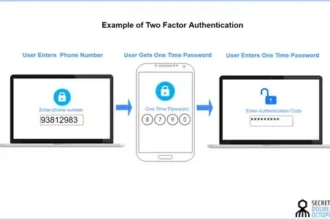
Enable two-factor authentication whenever possible. This adds an extra security layer.
Back up your files regularly to protect against ransomware.
Avoid downloading pirated or unknown software.
Be cautious on public Wi-Fi and consider using a VPN for sensitive tasks.
Small actions dramatically reduce your risk.
Final Thoughts
Hackers don’t need advanced techniques to steal information. Most attacks succeed because people aren’t aware of the risks.
Phishing tricks you into giving away passwords. Malware infects your device silently. Ransomware locks your files. Weak passwords and unsafe networks make everything easier for criminals.
But once you understand how these threats work, you’re already more protected than most users.
Cybersecurity isn’t about fear — it’s about awareness and smart habits.
By staying informed, thinking before clicking, and using basic protections, you can enjoy the benefits of the internet without becoming an easy target.
Because in today’s digital world, your information is valuable — and protecting it is your responsibility.
 Keep an eye on this