Your smartphone is no longer just a phone. It’s your wallet, your camera, your email inbox, your social network, your work device, and sometimes even your bank branch. Almost every part of your personal and professional life passes through that small screen you carry in your pocket.
Because of that, smartphones have become one of the biggest targets for hackers.
Many people still believe that only computers get viruses or that iPhones and Android devices are “naturally safe.” Unfortunately, that’s not true anymore. Cybercriminals actively target mobile users through fake apps, phishing messages, public Wi-Fi attacks, spyware, and data leaks.
(You will be redirected to another page)
The good news is that you don’t need to be a tech expert to protect yourself. With a few smart habits and the right settings, you can dramatically reduce your risk.
In this complete beginner-friendly guide, you’ll learn how hackers attack smartphones, what vulnerabilities to watch for, and practical security tips for both Android and iPhone users.
Why Smartphones Are Attractive Targets for Hackers
Think about how much sensitive information your phone stores.
It likely contains your emails, banking apps, credit cards, passwords, private photos, work files, contacts, and location history. If someone gains access to your device, they could steal your identity, empty your bank account, or spy on your personal life.
Smartphones are also easier to attack than many people realize. Users often connect to public Wi-Fi, install unknown apps, reuse weak passwords, and ignore updates. Hackers take advantage of these behaviors.
Unlike a laptop that stays at home, your phone travels everywhere with you, increasing the number of networks and risks it encounters.
That’s why mobile security is just as important as computer security today.
The Most Common Ways Hackers Attack Smartphones
Before learning how to protect your phone, it helps to understand the threats.
One of the most common attacks is phishing. Hackers send fake emails or text messages pretending to be banks, delivery companies, or social media platforms. When you click the link and enter your information, they steal your credentials.
Another common threat is malicious apps. Some apps contain hidden malware that spies on you or steals data in the background.
Public Wi-Fi attacks are also dangerous. On unsecured networks, criminals can intercept your traffic and capture sensitive information.
There is also spyware and stalkerware, which secretly monitors calls, messages, and location.
Finally, physical theft is still a major risk. If someone steals your phone and it isn’t properly locked, they can access everything instantly.
Understanding these risks helps you stay alert.
(You will be redirected to another page)
Use Strong Screen Locks and Biometrics
Your first line of defense is your lock screen.
Many people still use simple PINs like 1234 or their birthdate. These are extremely easy to guess. If your phone is lost or stolen, weak locks make it effortless for someone to break in.
Use a strong passcode instead. Choose at least six digits or, even better, an alphanumeric password.
Enable biometric protection such as fingerprint or face recognition. These methods are not only more secure but also faster and more convenient.
Also set your phone to lock automatically after a short period of inactivity. Waiting several minutes before locking increases your risk.
This simple step alone blocks many unauthorized access attempts.
Keep Your System and Apps Updated
Updates are not just about new features. They often include critical security fixes.
Hackers constantly discover vulnerabilities in Android, iOS, and popular apps. When companies find these problems, they release patches through updates.
If you ignore updates, your phone stays exposed to known weaknesses.
Turn on automatic updates for both your operating system and apps. This ensures you always have the latest protections.
Many cyberattacks specifically target outdated devices because they are easier to exploit.
Keeping everything updated is one of the easiest and most effective security habits.
Install Apps Only from Official Stores
Downloading apps from unknown websites is risky.
Third-party app stores often lack proper security checks, which means malicious apps can easily slip through. These apps may look normal but secretly steal your data or show intrusive ads.
Stick to official stores like Google Play Store and Apple App Store. Even there, read reviews and check the developer’s reputation before installing anything.
Be cautious with apps that ask for too many permissions. For example, a flashlight app should not need access to your contacts or microphone.
If something feels suspicious, don’t install it.
Fewer apps generally mean fewer risks.
Manage App Permissions Carefully
Every app requests permissions to access certain features like your camera, location, contacts, or storage.
Many users accept everything without thinking. This gives apps more access than necessary.
Review your permissions regularly.
Disable location tracking for apps that don’t truly need it. Remove microphone or camera access from suspicious apps. Restrict background activity when possible.
Both Android and iPhone provide built-in tools to manage permissions easily.
Limiting access reduces the amount of data apps can collect and lowers the damage if one becomes compromised.
(You will be redirected to another page)
Avoid Public Wi-Fi or Use a VPN
Public Wi-Fi networks are convenient but risky.
Hackers can create fake hotspots or spy on unencrypted traffic. You might think you’re connected to the café’s network while actually connected to a criminal’s device.
Avoid accessing banking apps, shopping websites, or sensitive accounts on public networks.
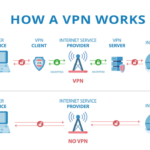
If you must use public Wi-Fi, use a VPN. A VPN encrypts your data, making it much harder for attackers to intercept your information.
This adds an important layer of protection, especially when traveling.
When possible, using your mobile data connection is usually safer than free Wi-Fi.
Enable Two-Factor Authentication
Passwords alone are not enough anymore.
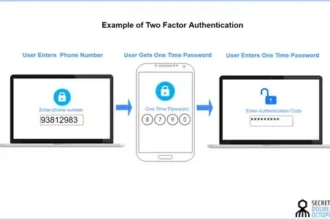
If someone steals or guesses your password, they can immediately access your account. Two-factor authentication (2FA) adds an extra step, such as a code sent to your phone or generated by an app.
Even if hackers know your password, they still can’t log in without the second factor.
Enable 2FA for email, banking, social media, and cloud storage accounts.
This simple feature dramatically increases your security and blocks most unauthorized logins.
Be Careful with Links and Messages
Many attacks start with a simple message.
Hackers send texts pretending to be delivery services, banks, or promotions. These messages often create urgency like “Your account will be locked” or “Package delivery failed.”
Clicking these links may install malware or send you to fake websites.
Never click suspicious links or download unknown attachments. Verify the sender first.
If unsure, visit the company’s official website directly instead of using the message link.
A moment of caution can prevent major problems.
Use Find My Device and Remote Wipe Features
Losing your phone is stressful, but you can prepare in advance.
Both Android and iPhone offer tools like “Find My Device” or “Find My iPhone.” These services allow you to locate, lock, or erase your phone remotely.
If your phone is stolen, you can wipe your data to prevent access.
Enable these features before you need them.
It’s like insurance for your personal information.
Final Thoughts
Your smartphone holds your digital life. Protecting it should be a priority, not an afterthought.
The good news is that mobile security doesn’t require complicated tools. Strong passwords, updates, careful app choices, VPN use, and two-factor authentication already provide powerful protection.
Hackers often target easy victims. By following the tips in this guide, you make yourself a much harder target.
In today’s connected world, a few smart habits can mean the difference between staying safe and becoming the next victim of a cyberattack.
Start protecting your smartphone today, because your privacy and data are worth it.
 Keep an eye on this